Assignment Goals
The assignment was to clone the search bar of the Korean Clinical Information website (https://clinicaltrialskorea.com/).
The three main objectives were:
- Search bar implementation: Handle keyboard events so users can fully operate the search bar with just the keyboard
- Autocomplete suggestions: Optimize the number of API requests made for search suggestions
- Caching: Implement local caching per API call
I thought this assignment would be straightforward, but I ended up struggling with keyboard event handling far longer than expected. Early on, I spent a lot of time thinking about how to separate modules by concern — what the right unit of responsibility should be for each module. In the end, the design didn't turn out quite the way I envisioned despite all that deliberation, so I plan to refactor and restructure the code after everything is done.
For now, this post covers how I approached the assignment before any refactoring.
Final Result
https://pre-onboarding-12th-3rd.vercel.app/
You can check out the final result at the link above.
The provided JSON server was deployed on Vercel for use in this project.
Implementation Goals
The search bar on the target website had some functional gaps, so I used it as a visual reference for cloning while drawing on Google's search bar for the functional behavior.
After studying Google's search bar, I identified four requirements to satisfy:
- Display the user's input: Preserve and show the user's current input at the top of the suggestion list
- Reflect selected suggestions in the search bar: When navigating to a suggestion, the input field updates to show that suggestion
- Reflect text changes back to the user's input: If the user edits text while a suggestion is selected, the change is reflected back to the user's input value
- While typing, the first item (the user's own input) is selected by default; moving to suggestions updates the selected item

Implementation Details
Let me walk through the implementation, starting with the simpler features.
1. Local Caching and Recent Search History
Personally, among global state management libraries I tend to prefer Zustand because it supports the Redux DevTools. I used Zustand for this assignment, and leveraged its persist middleware to save both the cache and recent search history to the browser's localStorage.
Local Caching
I split the global store by concern into separate stores for caching, recent keywords, search input, and API requests. The cacheStore responsible for caching stores data using the search keyword as the key, alongside a cache expiry time (due) and the cached data (data). I created two methods: setCache to save cache entries, and findCache to look up cached data.
setCache accepts a keyword key, the data to cache, and an optional expireTime, then stores the entry.
setCache: (key, data, expireTime = DEFAULT_EXPIRE_TIME): void => {
          const due = Date.now() + expireTime;
          set(state => ({ cache: { ...state.cache, [key]: { data, due } } }));
        },
findCache takes a keyword key, checks whether cached data exists for it, and returns either the data or undefined depending on whether it exists and whether it has expired. Writing this out now, I realize I should also add logic to delete expired entries when hasExpired is true.
// Returns cached data for the given keyword key
findCache: key => {
          const cacheData = get().cache[key];
          if (cacheData) {
            const hasExpired = cacheData.due < Date.now();
            if (hasExpired) return undefined;
            return cacheData.data;
          } else {
            return undefined;
          }
        },
Full cacheStore code:
// src/stores/cacheStore.ts
type CacheEntry = {
  data: DataType; // DataType is a custom-defined type
  due: number;
};

type State = {
  cache: Record<string, CacheEntry>;
  setCache: (key: string, data: DataType, expireTime?: number) => void;
  findCache: (key: string) => DataType | undefined;
};

export const DEFAULT_EXPIRE_TIME = 1000 * 60 * 60;

const useCacheStore = create<State>()(
  devtools(
    persist(
      (set, get) => ({
        cache: {},

        setCache: (key, data, expireTime = DEFAULT_EXPIRE_TIME): void => {
          const due = Date.now() + expireTime;
          set((state) => ({ cache: { ...state.cache, [key]: { data, due } } }));
        },

        findCache: (key) => {
          const cacheData = get().cache[key];
          if (cacheData) {
            const hasExpired = cacheData.due < Date.now();
            if (hasExpired) return undefined;
            return cacheData.data;
          } else {
            return undefined;
          }
        },
      }),
      { name: 'cacheStore' }
    )
  )
);

export default useCacheStore;
Recent Search History
Just like the cacheStore, I created a separate recentKeywordStore dedicated to managing recent search keywords.
The logic for saving recent keywords limits the list to a maximum of 10 entries and prevents duplicates. If the keyword being added already exists in the array (if (currentRecentList.includes(keyword))), it gets removed from its current position and added back at the top.
addKeyword: (keyword: string) => {
          let currentRecentList = get().recentKeywords;

          if (currentRecentList.includes(keyword)) {
            const idx = currentRecentList.indexOf(keyword);
            currentRecentList = [
              ...currentRecentList.slice(0, idx),
              ...currentRecentList.slice(idx + 1),
            ];
          }
          let updatedKeywords = [keyword, ...currentRecentList];

          if (updatedKeywords.length > 10) {
            updatedKeywords = updatedKeywords.slice(updatedKeywords.length - 10);
          }

          set({ recentKeywords: updatedKeywords });
        },
      }),
Full recentKeywordStore code:
type State = {
  recentKeywords: string[];
  addKeyword: (keyword: string) => void;
};

const useRecentKeywordStore = create<State>()(
  devtools(
    persist(
      (set, get) => ({
        recentKeywords: [],

        addKeyword: (keyword: string) => {
          let currentRecentList = get().recentKeywords;

          if (currentRecentList.includes(keyword)) {
            const idx = currentRecentList.indexOf(keyword);
            currentRecentList = [
              ...currentRecentList.slice(0, idx),
              ...currentRecentList.slice(idx + 1),
            ];
          }
          let updatedKeywords = [keyword, ...currentRecentList];

          if (updatedKeywords.length > 10) {
            updatedKeywords = updatedKeywords.slice(
              updatedKeywords.length - 10
            );
          }

          set({ recentKeywords: updatedKeywords });
        },
      }),
      { name: 'recentKeywordStore' }
    )
  )
);

export default useRecentKeywordStore;
2. Search Bar
Architecture Overview
It's hard to explain this chronologically, so let me describe the final structure instead.
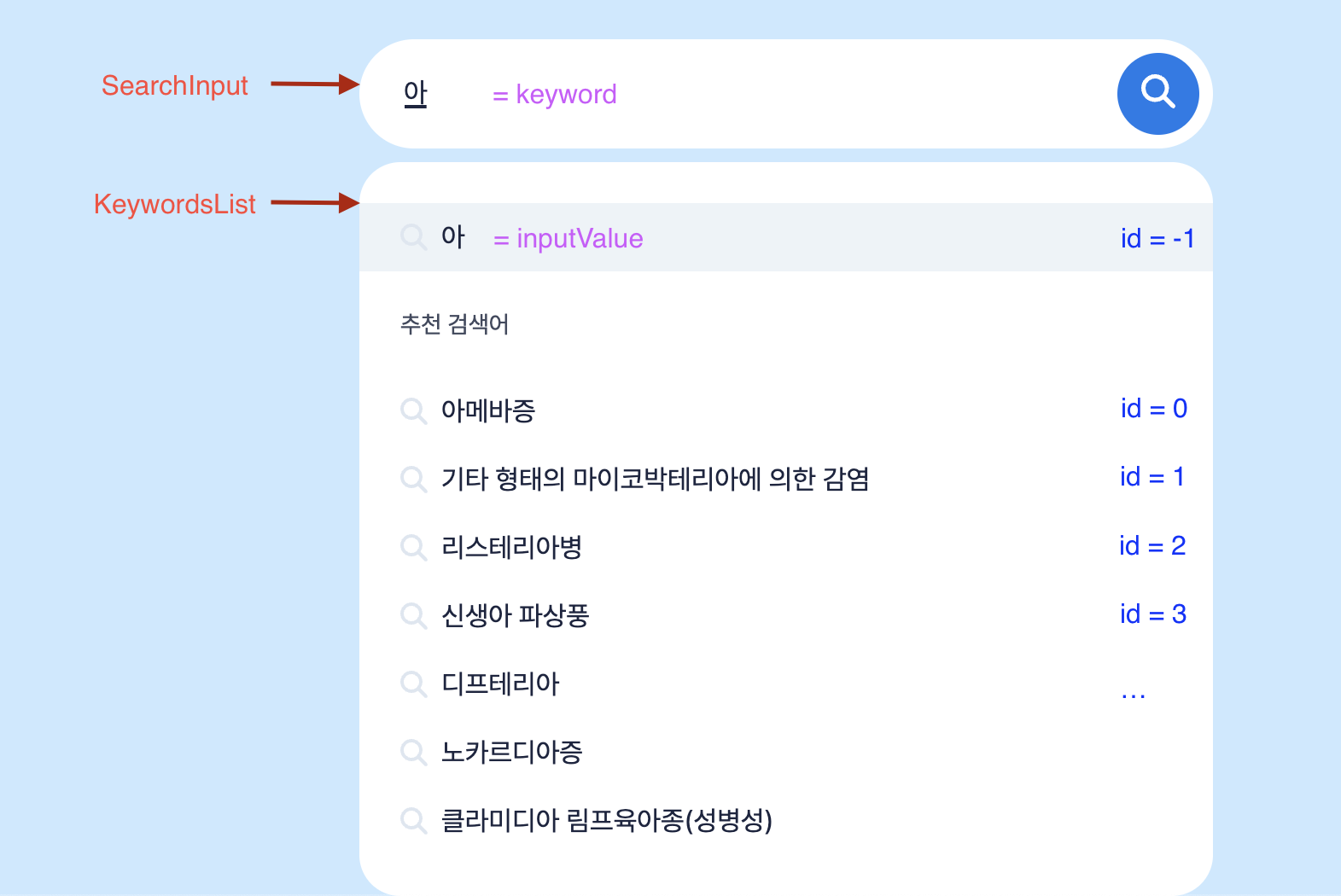
The component structure is divided into two main pieces: the search input (SearchInput) and the keyword list (KeywordsList).
I created a dedicated keywordStore to manage the search-related state and actions. Since the UI needs to display the user's typed input and the currently selected keyword simultaneously, I needed to track two separate values:
- The final selected keyword (
keyword) - The user's current input (
inputValue)
keyword is reflected in the search input field, while inputValue is displayed as the top item in the keyword list.
To support keyboard navigation through suggestions, I added a selectedId state that defaults to -1. When selectedId is -1, the search input shows the user's own input. When it's 0 or above, the input shows the suggestion at that index.
selectedId === -1→ treat the user's input as selected, showinputValuein the search barselectedId >= 0→ show the recent or suggested keyword at the matching index in the search bar
Also, whenever the user's input changes, an API request is fired to fetch autocomplete suggestions for that input. I needed to prevent that API request from being triggered when the user navigates the list with the keyboard.
To handle this, I introduced an isKeyDown boolean flag. When isKeyDown is true, API requests are blocked.
Here is the resulting keywordStore:
// src/stores/keywordStore.ts
const useKeywordStore = create<State>()(
  devtools((set, get) => ({
    isShowList: false,
    isKeyDown: false,

    keyword: '',
    inputValue: '',

    selectedId: -1,
    keywordsList: [],

    setState: (newState) => set({ ...get(), ...newState }),

    setIsShowList: (isShowList) => set({ ...get(), isShowList }),
    setIsKeyDown: (isKeyDown) => set({ ...get(), isKeyDown }),

    setKeyword: (keyword) => set({ ...get(), keyword }),
    setInputValue: (inputValue) => set({ ...get(), inputValue }),

    setSelectedId: (selectedId) => set({ ...get(), selectedId }),
    setKeywordsList: (keywordsList) => set({ ...get(), keywordsList }),
  }))
);

export default useKeywordStore;
It's hard to believe how much headache went into getting this structure right 😂
Now let's look at how each component is implemented internally.
Input onChange Handler
In the input's onChange handler, both inputValue and keyword are updated to reflect the current input value. selectedId and isKeyDown are also reset to their defaults.
const keywordOnChange = (e: ChangeEvent<HTMLInputElement>) => {
  const { value } = e.target;

  setIsKeyDown(false);
  setInputValue(value);
  setKeyword(value);
  setSelectedId(-1);
  setIsShowList(true);
};
keydown Event Handler
The keyDown handler contains two important pieces of logic:
- Prevent duplicate handler calls for Korean (CJK) input
- Because Korean characters are processed through IME composition, the
keydownevent fires twice — once from the OS and once from the browser. To prevent the handler from running twice, I check theisComposingproperty of theKeyboardEventand return early when it istrue.
- Because Korean characters are processed through IME composition, the
- Prevent cursor movement when pressing the arrow keys
- Pressing the up or down arrow keys was causing the cursor to move within the input. I used
event.preventDefault()to block that default behavior.
- Pressing the up or down arrow keys was causing the cursor to move within the input. I used
const handleKeyDown = async (event: KeyboardEvent<HTMLInputElement>) => {
  // Prevent duplicate handling for Korean (IME) input
  if (event.nativeEvent.isComposing) return;

  const { key } = event;

  if (key === 'ArrowUp') {
    event.preventDefault();
    setIsKeyDown(true);
    setSelectedId(Math.max(selectedId - 1, -1));
  } else if (key === 'ArrowDown') {
    event.preventDefault();
    setIsKeyDown(true);
    setSelectedId(Math.min(selectedId + 1, keywordsList.length - 1));
  } else if (key === 'Enter' && keyword.trim()) {
    event.preventDefault();
    addKeyword(keyword);
    setIsKeyDown(false);
    setIsShowList(false);
    setKeyword('');
    await setInputValue('');
    setSelectedId(-1);
    inputRef.current?.blur();
  }
};
Autocomplete API Requests
I used debouncing to optimize the number of API requests for autocomplete suggestions. In this implementation, I debounced the keyword value itself. However, this approach causes multiple re-renders, so I plan to refactor it to debounce the API request function directly instead.
I wrote a custom hook that accepts a value and returns its debounced equivalent:
// src/hooks/useDebounce.tsx
import { useState, useEffect } from 'react';

export default function useDebounce<T>(value: T, delay = 300) {
  const [debouncedValue, setDebouncedValue] = useState(value);

  useEffect(() => {
    const timerId = setTimeout(() => {
      setDebouncedValue(value);
    }, delay);

    return () => {
      clearTimeout(timerId);
    };
  }, [value, delay]);

  return debouncedValue;
}
I defined a custom hook useSearchQuery to handle API calls for the current keyword. Before making an API call, it checks for a cache hit and uses the cached data if available; otherwise it fires the API request (cache miss).
// src/hooks/useSearchQuery.tsx
export const useSearchQuery = () => {
  const { setCache, findCache } = useCacheStore((state) => state);

  const { keyword, isKeyDown } = useKeywordStore((state) => state);

  const { setIsLoading, setData } = useFetchStore((state) => state);

  const debouncedKeyword = useDebounce(keyword, 300);

  useEffect(() => {
    const fetchData = async (text: string) => {
      if (isKeyDown) return;

      try {
        setIsLoading(true);
        const { data } = await searchByKeyword(text);
        setData(data);
        setCache(text, data);
      } catch (err) {
        setError(err);
      } finally {
        setIsLoading(false);
      }
    };

    if (isKeyDown) return;
    if (keyword === '') return;

    const cacheResult = findCache(keyword);

    if (cacheResult) {
      // cache hit
      setData(cacheResult);
    } else {
      // cache miss
      fetchData(debouncedKeyword);
    }
  }, [isKeyDown, keyword, debouncedKeyword]);

  return;
};
Retrospective
This was my first time working with keyboard events, and I genuinely didn't expect a search bar I use every day to be this tricky. I thought it would be easy...
Looking at how much I focused on readability, extensibility, and maintainability while writing this code, I can feel how much I've grown. Comparing it to the code I submitted for my initial pre-screening assignment, the quality improvement is massive.