In my previous post, I walked through how I implemented the Week 3 assignment from the Pre-Onboarding Internship. One of the requirements was to "optimize the number of API requests," and I used debouncing to achieve that. Honestly, the schedule was incredibly tight — both the team assignment and the individual assignment had to be completed in just three and a half days — so I ended up implementing debouncing without fully understanding it.
So today, I want to take the time to properly understand the concepts behind Debounce and Throttle.
Why Does It Matter?
Performance!
The short answer: performance optimization is a critical concern in web frontend development, and debouncing and throttling are two of the key techniques used to achieve it.
A web application's performance depends on many factors, but debounce and throttle are specifically used to handle user interaction events — things like scrolling, clicking, and keyboard input — more efficiently. These events are processed by JavaScript's Event Listeners, and you can get a sense of how much impact they can have through the CodePen example below.
https://codepen.io/tutsplus/pen/PoWrPNE
As you can see in that example, even a brief scroll can easily trigger 50, 100, or more scroll events in rapid succession. If each one of those events triggered an API request or an expensive computation, it could seriously degrade your application's performance.
This is exactly the kind of situation where debouncing and throttling come in — both techniques control the frequency of event callbacks to keep things running smoothly. Let's compare them and see how each one works.
Debounce vs Throttle
Both debouncing and throttling control how often an event handler fires, but they work differently and suit different use cases.
When events fire in rapid succession, debouncing groups those events together and only executes the handler once they've stopped, while throttling executes the handler at a fixed interval throughout the event stream.
For example, imagine applying both techniques to a scroll event with a 250ms timer. With debouncing, the function fires only after the user has stopped scrolling for 250ms. With throttling, the function fires every 250ms for as long as the user is scrolling.
Let's look at the image below to see how each technique handles a burst of continuous events:
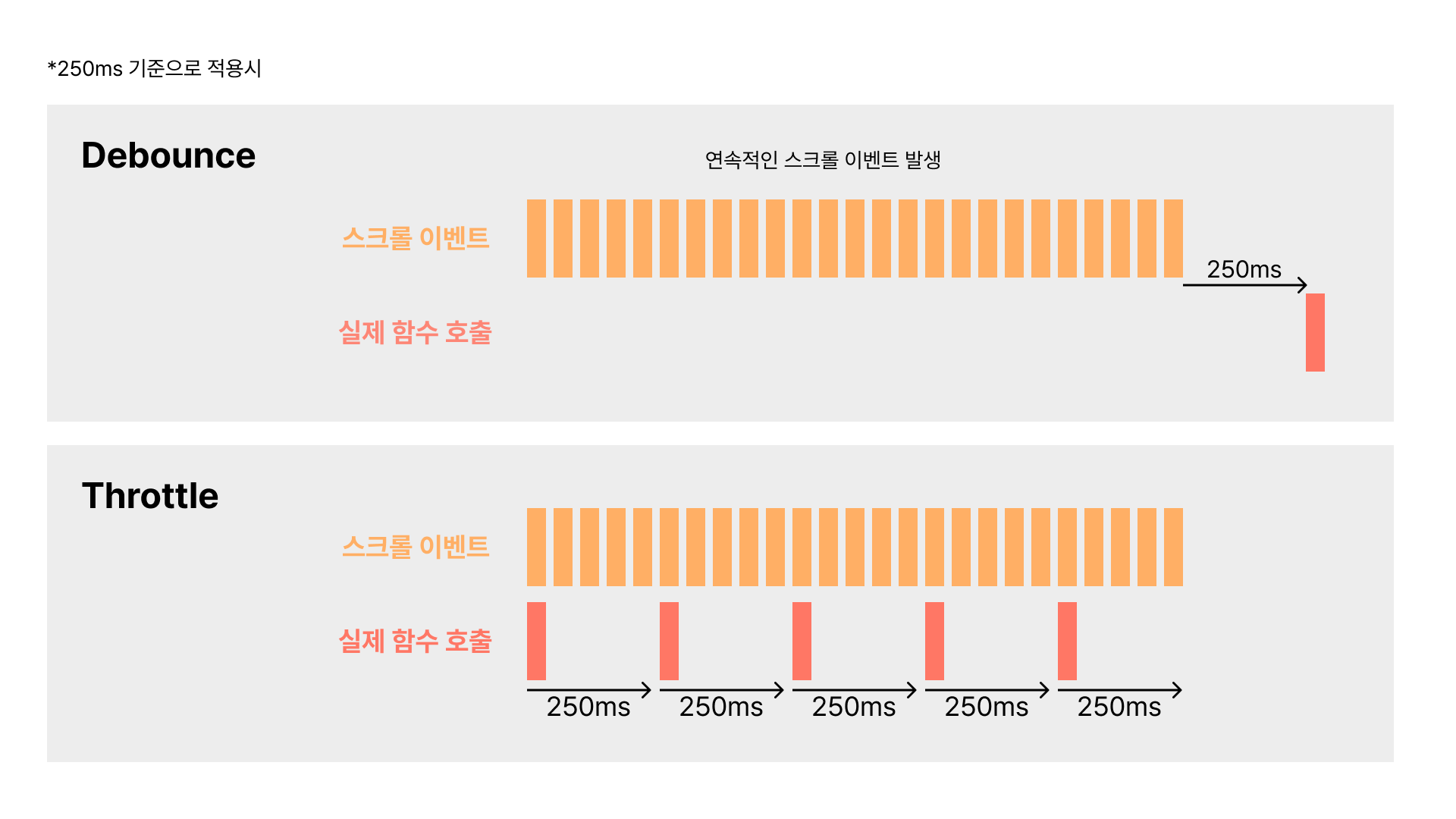
To summarize:
- Debounce: Calls the function only after the user has stopped triggering the event for a specified duration
- Throttle: Calls the function at a fixed time interval while the user continues triggering the event
Wrapping Up
My original plan was to cover both debounce and throttle — including React implementations of each — all in one post. But once I actually started implementing debounce in React, the process turned out to be longer than expected. So I've decided to split the content into three separate posts: the concepts behind debounce and throttle, implementing debounce, and implementing throttle.
Walking through the debounce implementation touches on a lot of interesting topics — component re-rendering, closures, and performance optimization — so I hope you'll check out the next post too! (link)
References
https://onlydev.tistory.com/151
https://webdesign.tutsplus.com/javascript-debounce-and-throttle--cms-36783t
https://velog.io/@soulee__/Javascript-쓰로틀링-디바운싱-throttle-debounce