What Is Next.js?
Next.js is a React framework for building web applications.
Next.js is a flexible React framework that gives you building blocks to create fast web applications.
The official Next.js documentation introduces it as "The React Framework." The word "framework" means that Next.js is a tool that provides the structure and features you need to use React well.
So what does it mean to use React "well"?
To answer that, let's take a look at why Next.js was created in the first place.
The Background: Why Next.js Emerged
React has long been the dominant force in the frontend ecosystem. The main reason is that it's a tool for building SPAs (Single Page Applications), and the CSR (Client-Side Rendering) approach that SPAs use delivers a smooth, seamless navigation experience that enhances user experience.
However, because React uses CSR by default, it comes with some inherent drawbacks.
Drawbacks of React (CSR)
- Slow initial load time
- Disadvantaged in terms of Search Engine Optimization (SEO)
Next.js emerged to address these CSR drawbacks while still letting you use React.
So what exactly are the CSR shortcomings that Next.js helps solve?
The Drawbacks of CSR
Initial Load Time
One of CSR's strengths is that it allows users to interact with the application smoothly and seamlessly.
Why is this possible in CSR?
The answer is that when a user first visits an application, the browser downloads all the JavaScript files needed to run that application. Once everything is loaded, navigating to other pages within the app requires no additional wait time — the user can interact with the page right away.
But this is precisely why CSR has a slow initial load time — it's both a strength and a weakness.
To mitigate this, CSR applications sometimes use code splitting. (Next.js supports this out of the box.)
Search Engine Optimization
To understand why CSR is at a disadvantage for SEO, it helps to briefly understand how search engines work.
Major search sites like Google, Yahoo, and Naver each have their own search engine crawlers (web crawlers). These are automated programs that browse billions of web pages across the internet, collecting content and indexing each page based on what information it contains.
Web crawlers analyze the initial HTML of a page to understand its structure and content. In CSR, content is rendered using JavaScript after the initial page load. The problem is that web crawlers don't execute JavaScript as extensively as a regular browser does, and they often don't wait for rendering to complete.
This is why SEO is difficult with CSR — the initial HTML is either empty or contains very little meaningful content for crawlers to index.
For more details on how Google Search works, check out the Google Search Central blog below.
https://developers.google.com/search/docs/fundamentals/how-search-works
What It Means to Use React "Well"
In conclusion, using React "well" through the Next.js framework means leveraging Next.js's features to compensate for CSR's drawbacks while still building with React.
How Does Next.js Address These Issues?
Next.js addresses both CSR drawbacks with two core features: Pre-rendering and Code Splitting.
Pre-rendering
In Next.js, every page is pre-rendered by default. This means Next.js generates the HTML for each page on the server ahead of time.
Next.js supports two forms of pre-rendering:
- Server-side Rendering (SSR)
- Static Generation (SSG)
As mentioned earlier, search engine crawlers need an HTML file to crawl a page and analyze its content. By using Next.js and serving pre-rendered HTML, you enable crawlers to properly analyze the pages you've built.
Code Splitting
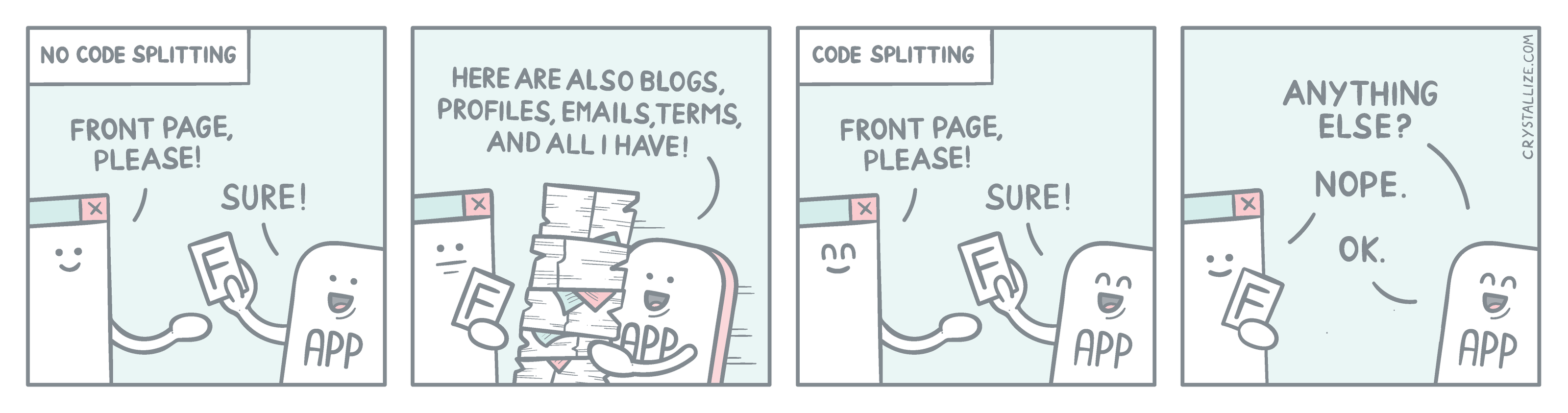
Code Splitting is the practice of breaking up a web application's JavaScript code into smaller chunks that are loaded only when needed. The image above makes this concept immediately clear.
As mentioned earlier, CSR's slow initial load time stems from loading all JavaScript upfront. Code Splitting addresses this drawback, and Next.js handles it automatically.
By default, Next.js performs Code Splitting on Server Components and can progressively send UI chunks from server to client via streaming.
For Client Components, you can implement Lazy Loading through dynamic imports to apply Code Splitting manually.
Note: Dynamic import is a pattern where a component's file is imported dynamically only when it's needed, as shown in the example below.
import dynamic from 'next/dynamic';

// Server Component:
const ServerComponent = dynamic(() => import('../components/ServerComponent'));

export default function ServerComponentExample() {
  return (
    <div>
      <ServerComponent />
    </div>
  );
}
By supporting Code Splitting this way, Next.js loads only the files needed for the current page, reducing the initial load time significantly.
React = CSR, Next.js = SSR?
So does that mean React is Client-Side Rendering and Next.js is Server-Side Rendering?
The answer is no!
CSR is simply the most commonly used rendering approach in React, and Next.js is a framework built on React that supports SSR.
SSR can be implemented in React as well, and Next.js supports both CSR and SSR.
SSR in React
Implementing SSR in React involves setting up a frontend server using Node.js to handle server-side rendering. This process is quite complex — which is exactly why Next.js, with its built-in support for SSR and Code Splitting, is truly revolutionary!!!
CSR in Next.js
While Next.js uses server-side rendering by default, it also supports client-side rendering for individual pages or components. In Next.js, components are broadly divided into two types: Server Components and Client Components. A Client Component is one intended to render on the client side, and you signal this to Next.js by adding the 'use client' directive at the top of the file.
'use client';

import { useState } from 'react';

export default function Counter() {
  const [count, setCount] = useState(0);

  return (
    <div>
      <p>You clicked {count} times</p>
      <button onClick={() => setCount(count + 1)}>Click me</button>
    </div>
  );
}