This article is based on Next.js version 13.
The Problem
I built this tech blog as a statically hosted website using Next.js.
After finishing development, I first deployed it on Vercel to confirm everything worked, then took on the challenge of deploying it myself using AWS. When I deployed to AWS S3, I started getting 404 errors on paths like .../post/[...slug] — routes that had worked perfectly fine both locally and on Vercel!
Diagnosis
The key thing to understand here is that this project uses static generation to render each blog post page, and then hosts the result as a static website. The idea is to pre-generate all the static files (HTML, CSS, JS) for every route, and serve them as a static site.
Static page generation means: for a given page, an HTML file is created ahead of time. When a request comes in for that page, the pre-generated HTML file is served to the client.
So maybe the 404 errors are happening because the HTML files for those routes simply don't exist?
With this educated hunch in mind, I went to check whether all the HTML files were actually there. But first, let me explain the Static Exports feature in Next.js — the process by which static files are generated.
Static Exports
Next.js supports Static Exports, which lets you build and host a static site using only HTML, CSS, and JS assets. (Static export means generating static files for every route.)
When running
next build, Next.js generates an HTML file per route. By breaking a strict SPA into individual HTML files, Next.js can avoid loading unnecessary JavaScript code on the client-side, reducing the bundle size and enabling faster page loads.
As the official docs explain, unlike a plain React app, running next build in Next.js generates an HTML file for each route.
The static files produced by static export are placed in the ./out folder. I opened ./out to check whether all the HTML files were there.
Were All the HTML Files Generated?
I looked inside the out folder — where the static export output lives for my project.
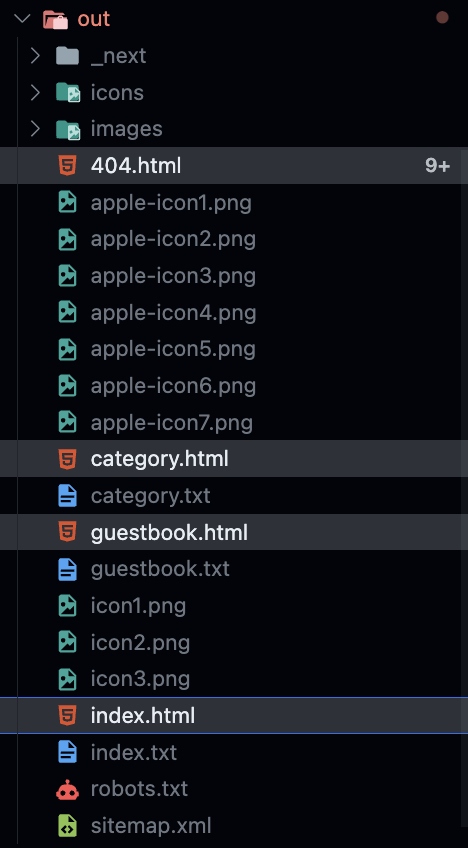
There were only four HTML files: 404.html, category.html, guestbook.html, and index.html. No matter where I looked, I couldn't find HTML files for individual post pages!
So of course, when a request came in for "give me the HTML for this post," the server responded with a 404 — because that file simply didn't exist.
The conclusion: HTML files needed to be generated for every route that was returning a 404.
The Fix
Each post page was using the Catch-all Segments pattern for dynamic routing (official docs) — something like /post/[...slug] — and every URL matching that pattern was throwing a 404.
Thinking this must be a dynamic routing issue, I dug into the official docs and found a function called generateStaticParams. Reading the description, I realized it was exactly what I needed to solve this problem.
What is generateStaticParams?
Let's look at how the official docs describe it:
The
generateStaticParamsfunction can be used in combination with dynamic route segments to statically generate routes at build time instead of on-demand at request time.
In other words, generateStaticParams lets you use it alongside dynamic routing to generate routes statically at build time, rather than generating them on the fly for each incoming request.
The "generate on each request" approach is SSR, and the "generate statically at build time" approach is SSG. (If you've studied SSG, SSR, and CSR, this distinction will click right away.)
With SSR, a page is generated when a request comes in and then sent to the client. With SSG, pages are generated ahead of time at build, and when a request comes in, the pre-built page matching that request is served to the client.
What generateStaticParams Does
generateStaticParamsshould return an array of objects where each object represents the populated dynamic segments of a single route.
To pre-generate an HTML file for each route at build time, generateStaticParams computes all the routes created by dynamic routing and returns the list of params for those routes.
At build time (next build), generateStaticParams runs before layouts or pages are rendered. It produces the list of params, and Next.js uses those params to trace which paths will be generated for that route, then creates the corresponding HTML file for each one.
For example, if you have a dynamic route like /post/[slug], using generateStaticParams computes all the real paths that match /post/[slug] and returns an array containing the params that correspond to the [slug] dynamic segment.
The table below shows what return type generateStaticParams should produce depending on the route type. (Excerpt from official docs)
| Type | Example Route | generateStaticParams Return Type |
|---|---|---|
| Single Dynamic Segment | /product/[id] | { id: string }[] |
| Multiple Dynamic Segment | /products/[category]/[product] | { category: string, product: string }[] |
| Catch-all Dynamic Segment | /products/[...slug] | { slug: string[] }[] |
For reference, in the Pages Router, getStaticPaths serves the same purpose as generateStaticParams.
Usage
Here's an example for a Single Dynamic Segment:
For a route like .../product/[id]:
// app/product/[id]/page.tsx

export function generateStaticParams() {
  return [{ id: '1' }, { id: '2' }, { id: '3' }];
}
Here, the [id] dynamic segment has three possible values: 1, 2, and 3. The params generated here are passed as props to the Page component and can be used inside it.
// app/product/[id]/page.tsx

export default function Page({ params }: { params: { id: string } }) {
  const { id } = params;
  // ...
}
Problem Solved!
Below is an example of using generateStaticParams with a Catch-all Dynamic Segment. Since my project used /post/[...slug] — a Catch-all Dynamic Segment — I applied it the same way and fixed the issue!
// app/product/[...slug]/page.tsx

export function generateStaticParams() {
  return [{ slug: ['a', '1'] }, { slug: ['b', '2'] }, { slug: ['c', '3'] }];
}

// Three versions of this page will be statically generated
// using the `params` returned by `generateStaticParams`
// - /product/a/1
// - /product/b/2
// - /product/c/3
export default function Page({ params }: { params: { slug: string[] } }) {
  const { slug } = params;
  // ...
}
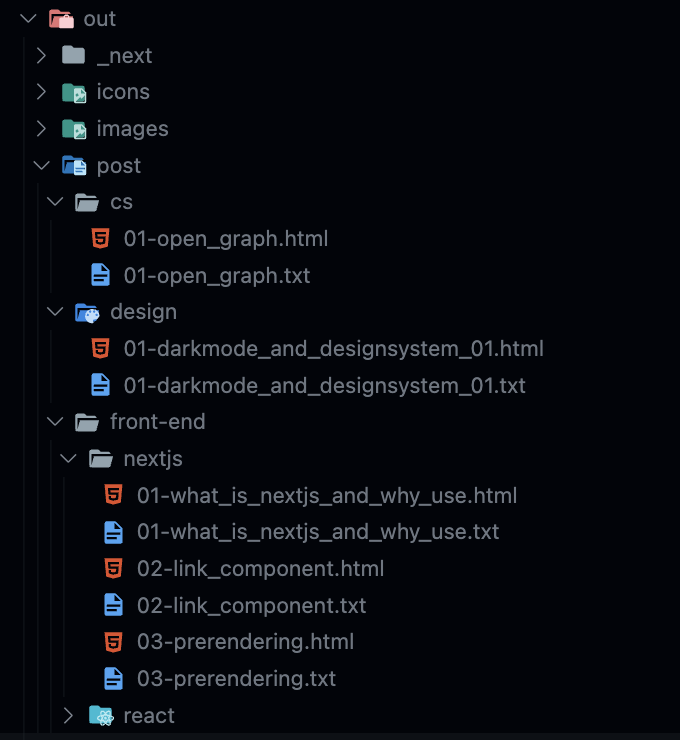
And just like that — after applying generateStaticParams and running the build, I could confirm that HTML files were newly generated for each route.
References
All content is based on the official Next.js 13 documentation. For more details, please refer to the official docs.
https://nextjs.org/docs/app/building-your-application/deploying/static-exports
https://nextjs.org/docs/app/api-reference/functions/generate-static-params